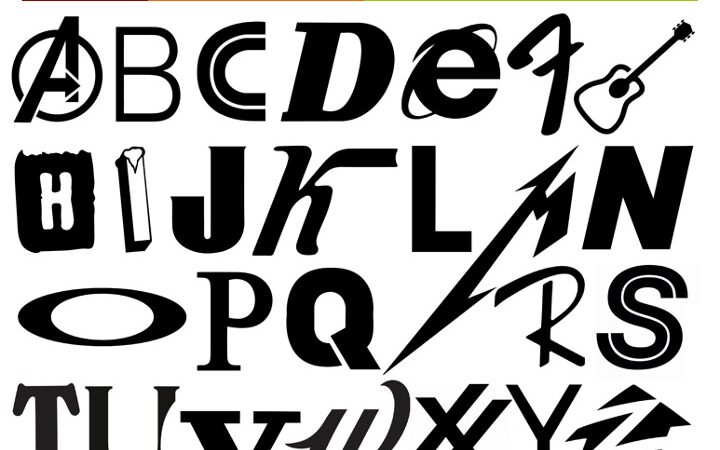
Logo Alphabet – The Power of Brand Recognition Your assignment is to create an alphabet quiz in an animated powerpoint presentation by extracting a letter from a brand name. The goal is to have people guess what the brand is. Create a powerpoint presentation that shows all letters of the alphabet along with the original logo type that the letter form came from. Your powerpoint presentation should have a cohesive look and theme throughout each slide. Choose one font for your copy and keep your text consistent from frame to frame in a cohesive format.

Logo Alphabet – The Power of Brand Recognition
Your assignment is to create an alphabet quiz in an animated powerpoint presentation by extracting a letter from a brand name.
The goal is to have people guess what the brand is.\
You will need to do some work to use Photoshop to isolate the letter form from the logo (create a clean silhouette without any pixilation) and save it as a transparent .PNG. Then import them into a PowerPoint slide. You will also be graded on how well your letterforms look. You will be marked down if your logos are pixilated or if the backgrounds are not cleanly removed.
Look for logos on the web. Choose the largest size you can find to download.
Find brands that you can use to make a quiz from the letters A through Z.
Download them into your ASSETS folder in your PROJECT FOLDER.
Note: Be sure to change your setting on your browser to ask where to save your downloads, that way you can route your images directly into your Assets folder! Please ask if you don’t know how to do this 🙂
1. TITLE SLIDE: Create a title slide with the class title, presentation title, the school name and your name and date. Name your file: Lastname_LogoAlphabet.pptx
2. ALPHABET SLIDE: Create an engaging quiz. Introduce each letter of the alphabet on one slide starting with the letter A. You can use animation incoming, outgoing effects and transitions – just be careful to not over do it. Be strategic in your animation choices. Too many make a presentation busy and distracting.
3. LOGO REVEAL SLIDE: Follow the Alphabet slide with the actual logo that you extracted the character from.
4. REPEAT STEPS 2 TO 3:
Continue creating letter abstractions for the rest of the alphabet B through Z
5. END SLIDE: Include one slide at the end that incorporates all of the alphabet letter forms on one slide.
Resource Video:
This video is a comprehensive introduction to logos and trademarks.
My Trademark Can Beat Up Your Trademark
Linda Joy Kattwinkel & Shel Perkins
https://www.aiga.org/inspiration/talks/linda-joy-kattwinkel-shel-perkins-my-trademark-can-beat-up-your-trademark