Type as Emotion – Interpretive Letterforms
Generate a composition using typography to express a specific emotional state.
Objective
To use type as an artistic element, to emphasize the interpretive potential of typographic form, and to communicate a specific meaning (the feeling of an emotion) through design.
• The letterforms need to be primarily BLACK on a WHITE BACKGROUND.
• Use color ONLY IF the concept dictates it.
• NO photography is to be used in the design.
• NO colored background.
• Utilize Gestalt principles in using negative and positive space. (About Gestalt Here)
• The software for this project to be used is Adobe Illustrator.
• The size of each final composition is to be 11″ wide x 8.5″ high (no bleeds) a.k.a. Landscape Orientation.
• The interpretive word should be centered on the page and be made as large
as possible to fit the space with a nice margin of white space around it.
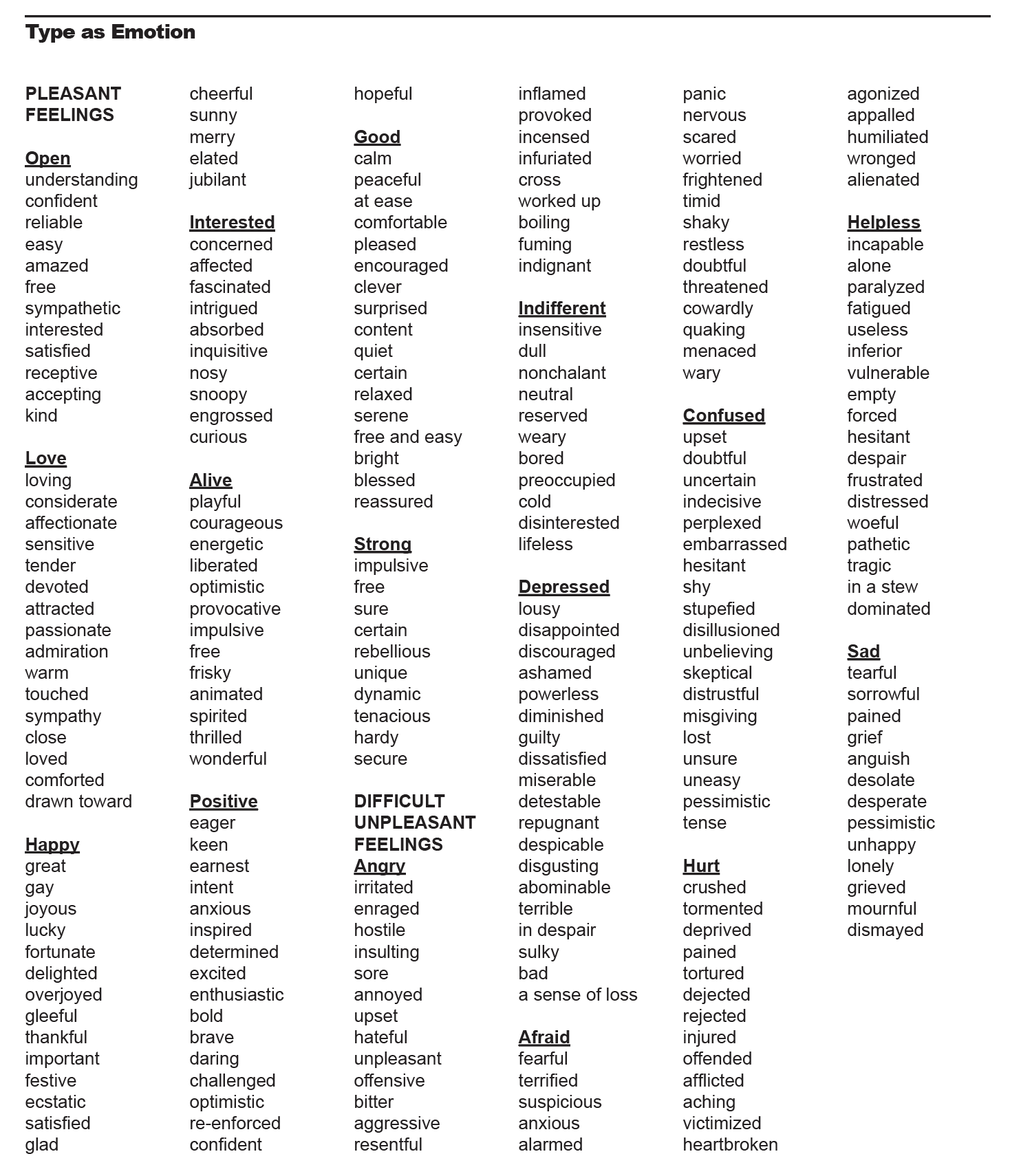
• Develop (12) twelve different designs from the list of emotions on the
reverse side of this page.
CONCEPTS/SKETCHES:
If you have hand sketched the concepts, photograph them and put them into 1 document. You can place your images in a google doc if you’d like.
If you are working on an ipad, or on the computer for your concepts, save your files as PDFs and then upload the PDF of your concepts.
NOTE: FOR THIS PROJECT ONLY, YOU DON’T NEED TO INCLUDE TRIM MARKS!!!!!
BECAUSE THIS CLASS IS OVER LOADED, We won’t be able to review everyone’s work within the classtime and be able to get through all the material we need to cover this semester.
ALL PROJECT DUE DATE ARE MUST BE UPLOADED TO GOOGLE CLASSROOM by 8AM on the assigned due date. That will allow me time to review your work in class while you are working on the next project. We won’t be having group reviews this semester, however I will schedule a group critique once our final prints are ready.
FINAL FILES:
• #1 SUBMIT (1) PRESS QUALITY PDF (NO TRIM MARKS)
that contains all 12 Word Designs on separate pages to GOOGLE CLASSROOM.
• #2 SUBMIT a ZIP file of your PACKAGED ILLUSTRATOR FILE.
ALL FONTS MUST BE CONVERTED TO OUTLINES.
To package an Illustrator file: File/Package
Select the Project Folder and Zip the file on Mac:
FROM TRACK PAD: CONTROL/CLICK/COMPRESS
WITH A MOUSE: RIGHT CLICK/COMPRESS
Below is a list of emotions to get you thinking about your project!
Student Examples
Spring 2021