The Assignment
Design a 24-Page Publication/Magazine.
The publication is 20 pages + cover = 24-pages total.
We will be breaking this project down into several phases.
Phase One
1. Publication Proposal – in a written document (PDF) provide a title to your publication, describe who your intended audience is, what is the benefit to this audience, what is the style of the publication (i.e. photographic, illustrative, both), include an outline (a table of contents) of your planned content. Include:
2. Thumbnail Dummy Mock-up The thumbnail dummy mock-up is a small PHYSICAL folded paper mock-up with the total number of pages for your magazine. Number the pages and note the planned content and purpose of each page (i.e. Front Cover, Inside Cover, Back Inside Cover, TOC (table of contents), Articles, etc. This is your hands-on guide to where you are going to organize all your information.
INSTRUCTIONS:
1. Take 3 letter sized (8.5 x 11) pieces of paper.
2. Neatly and accurately cut the 3 pages in half to make 6 smaller pages that measure 5.5 x 8.5.
3. Stack them together evenly and fold them to make a booklet that is 5.5 high x 4.25 wide.
4. Burnish the spine to make the booklet lay nice and flat.
5. Neatly label each page with a black marking pen as follows:
– Front Cover
– Inside Front Cover
– Page 1 through 20 (Page one always falls on a right-hand page is sometimes the Table of Contents (TOC).
right-hand pages are always an ODD number and left-hand pages are always an EVEN number.
– Inside Back Cover
– Back Cover
6. When you have planned out your content, mark up this mock-up as to where you are placing your articles, etc.
3. Logo + Masthead + Cover Design: Develop a logotype that will be used on the masthead / cover of the magazine. Also, by this time you need to have a good idea of all the articles, images, and placement of your content on your publication.
The total number of pages in your magazine must be divisible by 4.
Composition Software: In-Design
NO BLANK PAGES WILL BE ALLOWED.
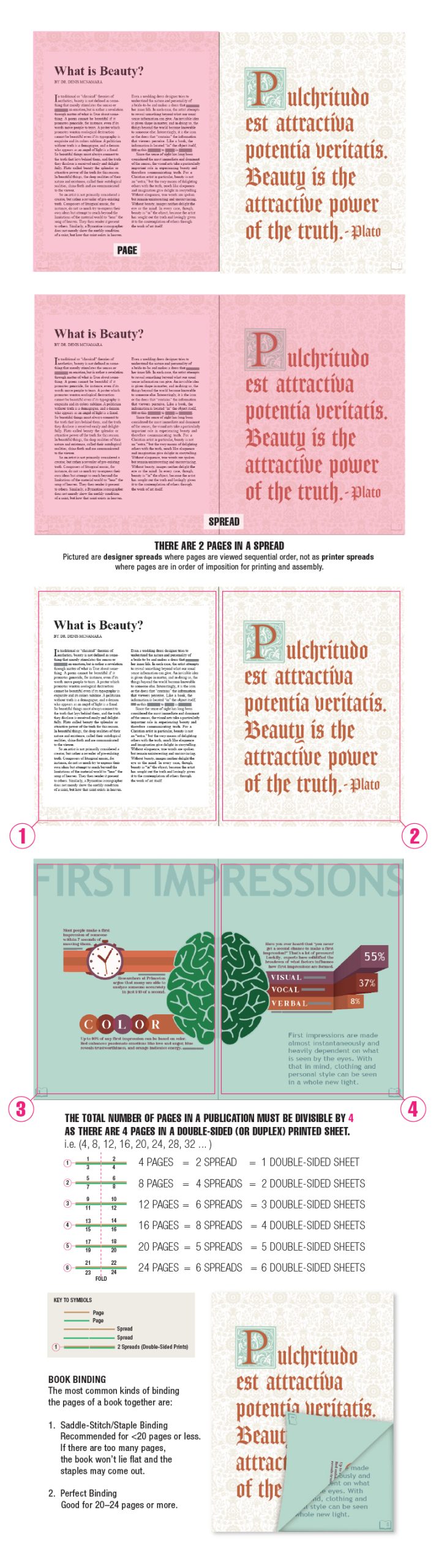
Note: Book Pages in infographic above were designed by Liza Trettle.
Student Examples
CLICK HERE TO VIEW BENEDICTINE GRAPHIC DESIGN STUDENT EXAMPLES!